
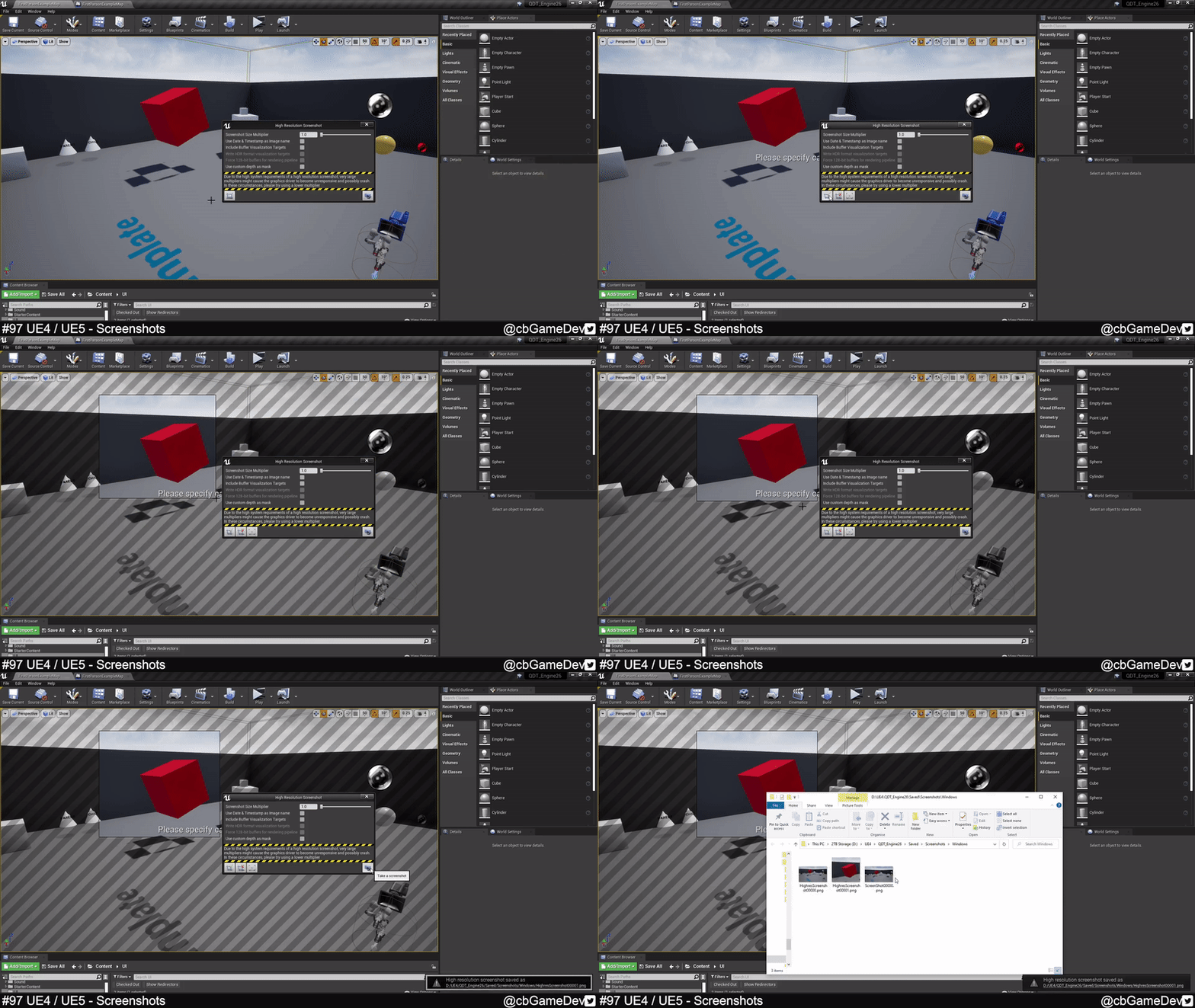
QUICK DEV TIP #97 UE4 / UE5 - Screenshots
Here is something that’s always useful to know about!
Did you know there are multiple ways to take screenshots in Unreal?
If you would prefer to watch my video version, check it out here
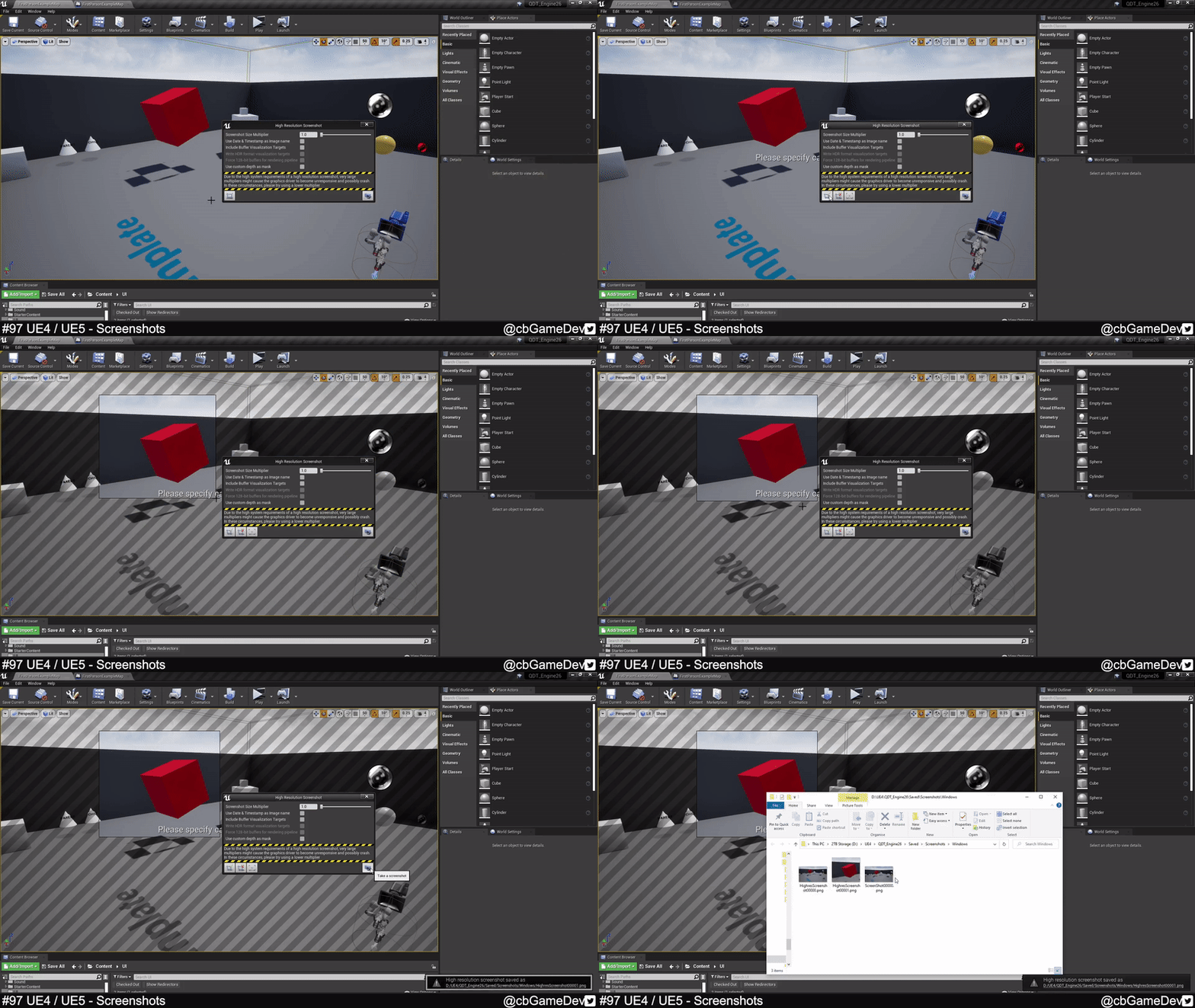
There are a bunch of different ways to do this. The first is taking a standard screenshot by pressing F9 whilst you are in your viewport.

After pressing the key look to the bottom right of your screen and you will see a little popup appear, which means it took a screenshot successfully.
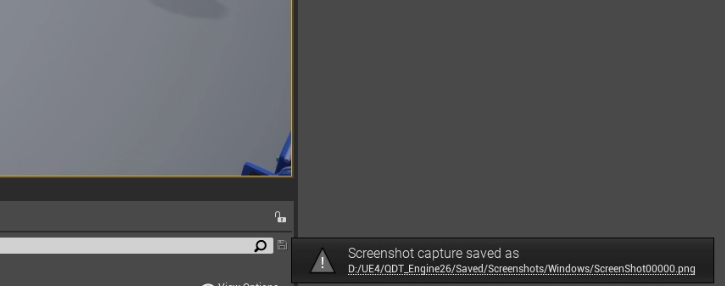
On the popup there is the file path of where the screenshot was saved. Clicking on the file path text will open the folder location. This is a very useful way to quickly get to the screenshot.

The second way to take a screenshot which gives you a lot more control is to go up to the top left of your viewport, click the little drop down, and then click on High Resolution Screenshot…
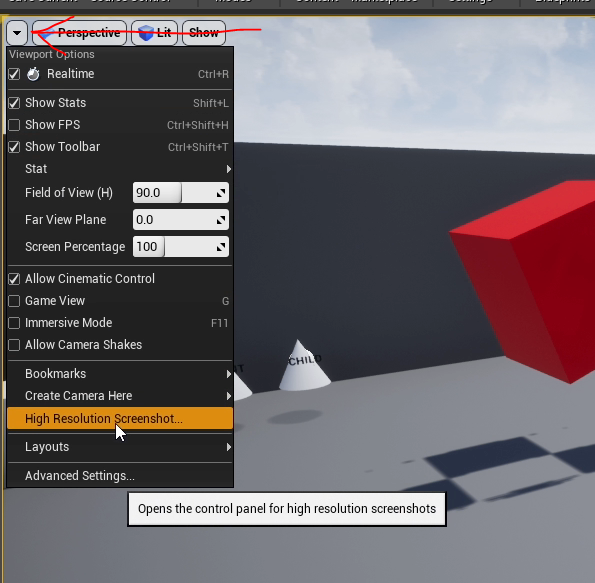
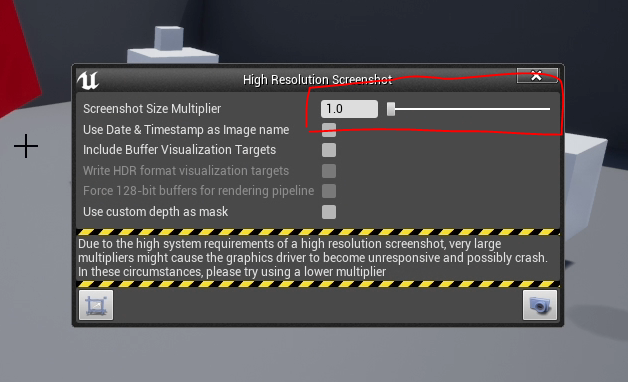
This will open a new window in the center of your viewport, with a few options to play with.

You can take a screenshot of your viewport by clicking the button with the camera in the bottom right. This will then show the same popup in the bottom right of your editor, which you can use to quick navigate to the images.

A setting that is useful to know about here is the Screenshot Size Multiplier (the slider at the top). This will multiply the resolution of the screenshot. So 2 would be x2, 3 would be x3 etc. If you notice below there is a warning about this because if you go too high can become intensive and can cause your computer to stall or even crash.
Another useful part of this method is that we can crop our selection before we take a photo by using the button in the bottom left hand side of the High Resolution Screenshot window.
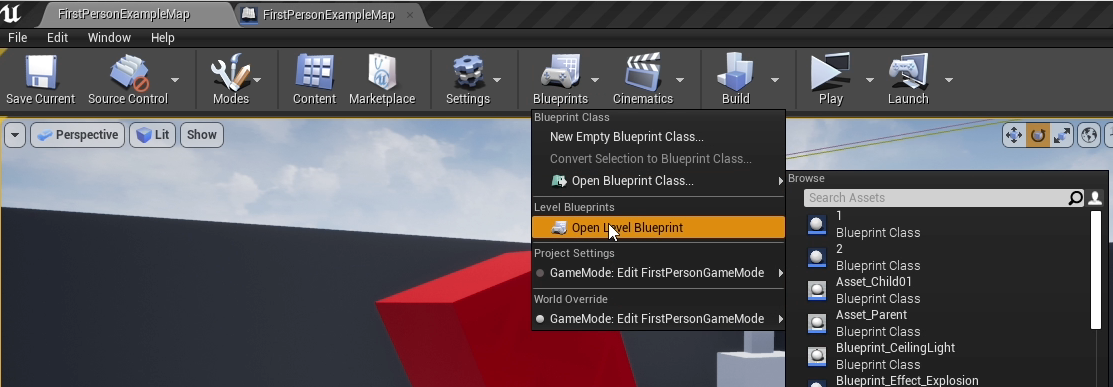
The third way is to use a console command, which can be useful for taking screenshots while we are playing. There are lots of places you could set this up but in my example, I’m doing it in the level blueprint. So open up your level blueprint by clicking on blueprint in your top bar then Open Level Blueprint.
Inside the level blueprint, we can setup a few nodes to create what we need. Basically, when the space bar is pressed I do a print and then the important bit I made an Execute Console Command blueprint node and put in the command HighResShot 2. The number on the end acts like the Screenshot Size Multiplier we saw in previous examples. Again don’t go too high but increasing this with give you better quality image.

If we now play in editor, every time we press the space bar we will take a screenshot. One thing to notice here is that you don’t get the UI in your screenshots.

So this is pretty much exactly the same in Unreal Engine 5. F9 for a standard screenshot still works. The High Resolution Screenshot window is still accessible in the same way (although it looks slightly different UI-wise)
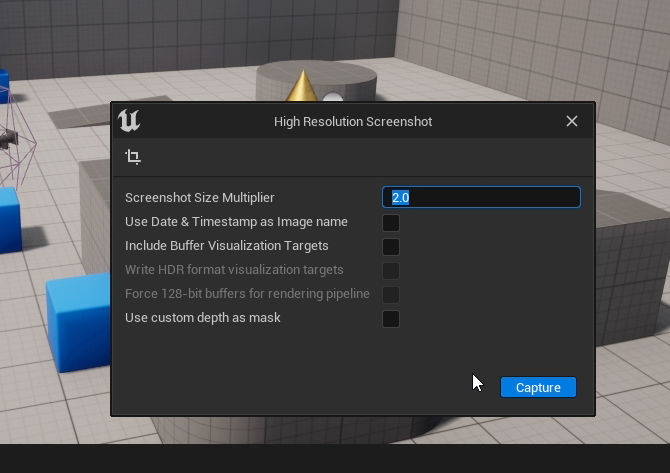
We can also run the same console command as well. I’ll show this in a slightly different way in UE5. Below I play in editor then I open up the console while playing and use HighResShot 2 to trigger a screenshot.

So there are a bunch of different ways to take screenshots but the ways I use most often are using the High-Resolution Screenshot window for most control (accessible via the top left of your editor viewport) and then using a console command via a key input to capture more gameplay based screenshots! These are great ways to help get nice shots of your game.
Want to know when I release new quick Unreal tips & tricks?
Enjoyed this? Check out my other work:
BLOG POSTS
-
2026
10
- 29 Jun 2026 Project Optimise Tool - Now UE5.8 Compatible
- 29 Jun 2026 Level Optimise Tool - Now UE5.8 Compatible
- 3 May 2026 How Bad Audio Organisation Was Costing Me Money (And How I Fixed It)
- 15 Apr 2026 My Tools Are 30% Off This Week!
- 4 Apr 2026 The Reality of Solo Game Development - Freerunners Postmortem
- 10 Mar 2026 Freerunners Flow Update
- 4 Mar 2026 Freerunners is Out Now on Steam!
- 10 Feb 2026 QUICK DEV TIP #113 UE5 - Multiple Viewports
- 5 Feb 2026 Zombie Typing is Part of Steam Typing Fest!
- 20 Jan 2026 QUICK DEV TIP #112 UE5 - Copy Paste Functions
-
2025
22
- 30 Dec 2025 QUICK DEV TIP #111 UE5 - Bulk Rename Assets
- 7 Dec 2025 QUICK DEV TIP #110 UE5 - Thicken Trigger Volumes
- 16 Nov 2025 Level Optimise Tool - UE5.7 Compatible Version
- 15 Nov 2025 Project Optimise Tool - UE5.7 Compatible Version
- 5 Nov 2025 Quick Dev Insights #10 - Designing Dynamic Game Music Systems - with Pav Gekko
- 1 Nov 2025 Updated My Website Look!
- 26 Oct 2025 New Branding!
- 15 Oct 2025 Quick Dev Insights has a new home!
- 13 Oct 2025 Zombie Typing is Live in Steam Next Fest!
- 9 Oct 2025 Quick Dev Insights #09 - Technical Animation In Games - With Liam Lambert
- 4 Oct 2025 Zombie Typing - Demo Released To Steam
- 13 Sept 2025 Zombie Typing - Full Game Announcement!
- 10 Sept 2025 Quick Dev Insights #08 - Designing Sounds For Games - with Ben Ridge
- 13 Aug 2025 LEVEL OPTIMSE TOOL - UE5.6 Compatible Version Released!
- 9 Aug 2025 Project Optimise Tool - Updated to V3.2!
- 7 Aug 2025 QUICK DEV TIP #109 UE5 - Filtering Output Logs
- 23 Jul 2025 QUICK DEV TIP #108 UE5 - Bulk Fill Array
- 23 Jul 2025 QUICK DEV TIP #107 UE5 - Orbit Camera Mode
- 21 Jul 2025 Devumentary: ZOMBIE TYPING
- 15 Jul 2025 Zombie Typing Game Demo Launched!
- 25 Apr 2025 Optimising Your Unreal Engine 5 Project
- 29 Mar 2025 Level Optimise Tool - Released Onto FAB Marketplace
-
2024
20
- 24 Nov 2024 Project Optimise Tool Released Onto FAB Unreal Marketplace!
- 12 Oct 2024 I Released Project Optimise V3.1
- 17 Sept 2024 QUICK DEV TIP #106 UE4 / UE5 - Toggle Debug Camera
- 7 Sept 2024 Quick Dev Insights #07 - Developing For The Playdate - Ollie Coe
- 3 Sept 2024 QUICK DEV TIP #105 UE4 / UE5 - Debugging UI With The Widget Reflector
- 3 Sept 2024 QUICK DEV TIP #104 UE4 / UE5 - Quick Select Input Key
- 2 Sept 2024 QUICK DEV TIP #103 UE4 / UE5 - Auto Navigate to Blueprint Error
- 28 Aug 2024 Indie Dev Story is now available on Steam for FREE!
- 20 Aug 2024 Quick Dev Insights #06 - Starting and running your own outsourcing studio - Rob Moody
- 4 Aug 2024 QUICK DEV TIP #102 UE4 / UE5 - List Modified Variables
- 4 Aug 2024 QUICK DEV TIP #101 UE5 - Quick Copy Paste Variables
- 31 Jul 2024 Indie Dev Story Patch Notes for V1.3
- 22 Apr 2024 Testing out Tech: Adobe Express - Animations from Audio
- 20 Apr 2024 Made a new Game: Ultra Ball!
- 5 Mar 2024 FREERUNNERS PROGRESS - More ways to Fail
- 27 Feb 2024 Freerunners Progress - A better flow
- 21 Feb 2024 Freerunners Marketing, Lets get started!
- 17 Feb 2024 FREERUNNERS Steam Next Fest Postmortem
- 7 Feb 2024 FREERUNNERS IS IN STEAM NEXT FEST FEB 2024!
- 25 Jan 2024 FREERUNNERS DEMO UPDATE! (JANUARY 2024)
-
2023
18
- 31 Dec 2023 Marauders Community Memes, Art and Cosplay! Dec 2023 Edition
- 27 Nov 2023 Freerunners Demo Updates! (November 2023)
- 7 Oct 2023 Project Optimise Tool (Unreal Engine) : How To Use
- 7 Oct 2023 Project Optimise Tool Is Now Downloadable From My itch.io Page
- 8 Sept 2023 Freerunners Demo Out Now!
- 4 Sept 2023 All Things Marauders (March - August 2023)
- 8 Aug 2023 10 Tips For Faster Blueprint Using
- 5 Aug 2023 Updated my Free Unreal Engine Tool: Project Optimise
- 10 Jun 2023 Meetup at the Team17 office!
- 28 Apr 2023 New Unreal Engine Tool: Project Optimise!
- 14 Apr 2023 21 UE4/UE5 Tips To Help You Build Out Levels Faster
- 31 Mar 2023 I did a talk at GDC!
- 4 Mar 2023 4 Material Editor Tips for Unreal Engine
- 25 Feb 2023 6 Tips for Faster Blueprinting!
- 13 Feb 2023 5 Useful Unreal Engine Blueprint Tips/Tricks
- 9 Feb 2023 3 Quick Unreal Engine Sound Tips/Tricks
- 20 Jan 2023 Compare Data tables Tool for Unreal Engine
- 3 Jan 2023 I Tried Rokoko Video - Free Ai Motion Capture
-
2022
55
- 29 Dec 2022 3 Quick Unreal Engine Animation Tips/Tricks
- 21 Dec 2022 Marauders: The Red Baron Update
- 6 Dec 2022 50 Quick Tips and Tricks for Unreal Engine. How many do you know?
- 5 Dec 2022 F1 Marauders Art
- 21 Nov 2022 QUICK DEV TIP #100 UE4 / UE5 - Snap To Surface
- 15 Nov 2022 Quick Dev Insights #02 - Level Designer - Alfie Bawden
- 12 Nov 2022 QUICK DEV TIP #99 UE4 / UE5 - Editor Asset Open Location
- 11 Nov 2022 Launching Marauders into EA
- 11 Nov 2022 Marauders Memes#1
- 7 Nov 2022 QUICK DEV TIP #98 UE4 / UE5 - Custom Asset Shadow
- 29 Oct 2022 QUICK DEV TIP #97 UE4 / UE5 - Screenshots
- 24 Oct 2022 QUICK DEV TIP #96 UE4 / UE5 - Copy Paste UMG Anims
- 16 Oct 2022 QUICK DEV TIP #95 UE4 / UE5 - Favourite Blueprint Nodes
- 12 Oct 2022 Rust bucket 3D Print
- 12 Oct 2022 QUICK DEV TIP #94 UE4 / UE5 - MATERIAL EDITOR KEYBOARD SHORTCUTS
- 27 Sept 2022 QUICK DEV TIP #93 UE4 / UE5 - Blueprint Keyboard Shortcuts
- 19 Sept 2022 QUICK DEV TIP #92 UE4 / UE5 - GAMEPLAY VIEW
- 10 Sept 2022 Marauders Progress
- 3 Sept 2022 QUICK DEV TIP #91 UE4 / UE5 - COMMENTING
- 22 Aug 2022 QUICK DEV TIP #90 UE4 / UE5 - GROUPING
- 15 Aug 2022 QUICK DEV TIP #89 UE4 / UE5 - LOCK IN PLACE
- 5 Aug 2022 QUICK DEV TIP #88 UE4 / UE5 - REORDER ARRAY
- 19 Jul 2022 QUICK DEV TIP #87 UE4 / UE5 - HIDE UI BINDINGS
- 12 Jul 2022 QUICK DEV TIP #86 UE4 / UE5 - CONSOLE COMMAND INFO
- 3 Jul 2022 QUICK DEV TIP #85 UE4 / UE5 - QUICK CHANGE VIEWPORT ANGLE
- 27 Jun 2022 QUICK DEV TIP #84 UE4 / UE5 - DELETE NODE, KEEP CONNECTION
- 19 Jun 2022 QUICK DEV TIP #83 UE4 / UE5 - MOVE WITH ASSET
- 12 Jun 2022 QUICK DEV TIP #82 UE4 / UE5 - EDITOR START UP LEVEL
- 6 Jun 2022 QUICK DEV TIP #81 UE4 / UE5 - VIEW FROM ASSET POINT OF VIEW
- 29 May 2022 QUICK DEV TIP #80 UE4 / UE5 - EXTRA INFO ABOUT NODES
- 29 May 2022 Quick Dev Insights #05 - Indie Games Publisher - Jeff Giasson
- 23 May 2022 QUICK DEV TIP #79 UE4 / UE5 - CONTENT BROWSER FILTERS
- 16 May 2022 QUICK DEV TIP #78 UE4 / UE5 - ADJUST GIZMO SIZE
- 10 May 2022 QUICK DEV TIP #77 UE4 / UE5 - FULL SCREEN VIEWPORT
- 3 May 2022 QUICK DEV TIP #76 UE4 / UE5 - SPEED TREE COLOUR VARIATION NODE
- 28 Apr 2022 Quick Dev Insights #04 - Building A Community - Dan Walters
- 26 Apr 2022 QUICK DEV TIP #74 UE4 / UE5 - OPTIMISING TICK RATE
- 25 Apr 2022 QUICK DEV TIP #75 UE4 / UE5 - MAP THUMBNAIL ICONS
- 12 Apr 2022 QUICK DEV TIP #73 UE4 / UE5 - GPU VISUALISER
- 9 Apr 2022 Quick Dev Insights #03 - Creating UI For Games - Ben Humphreys
- 5 Apr 2022 QUICK DEV TIP #72 UE4 / UE5 - TEMP CHANGE PIVOT
- 28 Mar 2022 QUICK DEV TIP #71 UE4 / UE5 - COPY PASTE LODs
- 24 Mar 2022 Marauders Has Been Announced!
- 22 Mar 2022 QUICK DEV TIP #70 UE4 / UE5 - OUTLINER FILTERING
- 15 Mar 2022 QUICK DEV TIP #69 UE4 / UE5 - CONSOLE COMMAND SEARCHING
- 7 Mar 2022 QUICK DEV TIP #68 UE4 / UE5 - HIGHLIGHTING CONNECTIONS
- 1 Mar 2022 QUICK DEV TIP #67 UE4 / UE5 - SAVE HARD DRIVE SPACE
- 21 Feb 2022 QUICK DEV TIP #66 UE4 / UE5 - NAME MATERIAL PINS
- 15 Feb 2022 QUICK DEV TIP #65 UE4 / UE5 - EDIT AUTOSAVE SETTINGS
- 6 Feb 2022 QUICK DEV TIP #64 UE4 / UE5 - HIDE ALL SCREEN MESSAGES
- 31 Jan 2022 QUICK DEV TIP #63 UE4 / UE5 - MEASURING DISTANCES
- 25 Jan 2022 QUICK DEV TIP #62 UE4 / UE5 - MATHS IN VARIABLES
- 17 Jan 2022 QUICK DEV TIP #61 UE4 / UE5 - STORE BLUEPRINT GRAPH POSITIONS
- 11 Jan 2022 QUICK DEV TIP #60 UE4 / UE5 - MIRROR ASSETS
- 3 Jan 2022 QUICK DEV TIP #59 UE4 / UE5 - SMALLER INTERFACE ICONS
-
2021
55
- 27 Dec 2021 QUICK DEV TIP #58 UE4 / UE5 - QUICK ADJUST CAMERA SPEED
- 20 Dec 2021 QUICK DEV TIP #57 UE4 / UE5 - BREAKPOINT ON BLUEPRINT ERROR
- 13 Dec 2021 QUICK DEV TIP #56 UE4 / UE5 - UMG REPLACE & WRAP WITH
- 6 Dec 2021 QUICK DEV TIP #55 UE4 / UE5 - MOVE VARIABLE TO PARENT
- 29 Nov 2021 QUICK DEV TIP #54 UE4 / UE5 - SELECT ALL OF THE SAME
- 22 Nov 2021 QUICK DEV TIP #53 UE4 / UE5 - LIGHT MAP STATISTICS
- 16 Nov 2021 QUICK DEV TIP #52 UE4 / UE5 - EVENT TO FUNCTION / FUNCTION TO EVENT
- 8 Nov 2021 QUICK DEV TIP #51 UE4 / UE5 - DISABLE BLUEPRINT NODE
- 1 Nov 2021 QUICK DEV TIP #50 UE4 / UE5 - EDITOR CALL EVENTS AT RUNTIME
- 25 Oct 2021 QUICK DEV TIP #49 UE4 / UE5 - SAVE LOAD LAYOUTS
- 18 Oct 2021 QUICK DEV TIP #48 UE4 / UE5 - QUICK MAKE ICONS
- 18 Oct 2021 My steam page got approved for my game Freerunners!
- 11 Oct 2021 QUICK DEV TIP #47 UE4 / UE5 - QUICK OPEN LEVEL ASSET
- 4 Oct 2021 QUICK DEV TIP #46 UE4 / UE5 - THUMBNAIL EDIT MODE
- 27 Sept 2021 QUICK DEV TIP #45 UE4 / UE5 - COMBINING MULTIPLE STATIC MESHES
- 20 Sept 2021 QUICK DEV TIP #44 UE4 / UE5 - RELATIVE AND WORLD TRANSFORMS
- 13 Sept 2021 QUICK DEV TIP #43 UE4 / UE5 - QUICK NAVIGATE TO BLUEPRINT PARENT
- 6 Sept 2021 QUICK DEV TIP #42 UE4 / UE5 - Automatically Reimport Files
- 30 Aug 2021 QUICK DEV TIP #41 UE4 / UE5 - Have Multiple Anim Sequences Open
- 24 Aug 2021 QUICK DEV TIP #40 UE4 / UE5 - Diffing Blueprints
- 16 Aug 2021 QUICK DEV TIP #39 UE4 / UE5 - Quick Tweak Textures
- 9 Aug 2021 QUICK DEV TIP #38 UE4 / UE5 - Animation Pose Into Static Mesh
- 2 Aug 2021 We Won An Award!
- 2 Aug 2021 QUICK DEV TIP #37 UE4 / UE5 - Colourblind Editor Mode
- 26 Jul 2021 QUICK DEV TIP #36 UE4 / UE5 - Saving Colours
- 19 Jul 2021 QUICK DEV TIP #35 UE4 / UE5 - Quick Switch Tabs
- 12 Jul 2021 QUICK DEV TIP #34 UE4 / UE5 - Find Across Whole Project
- 5 Jul 2021 QUICK DEV TIP #33 UE4 / UE5 - UMG Favourites
- 28 Jun 2021 QUICK DEV TIP #32 UE4 - Custom Grid Snap Amounts
- 21 Jun 2021 QUICK DEV TIP #31 UE4 - Favourite Folders
- 13 Jun 2021 QUICK DEV TIP #30 UE4 - Content Browser Icon Size
- 7 Jun 2021 QUICK DEV TIP #29 UE4 - Quick Make Pins
- 31 May 2021 QUICK DEV TIP #28 UE4 - Drop Asset To Surface
- 24 May 2021 QUICK DEV TIP #27 UE4 - Multiple Content Browsers
- 17 May 2021 QUICK DEV TIP #26 UE4 - Change Asset Default Transform
- 10 May 2021 QUICK DEV TIP #25 UE4 - Move Light In Static Mesh Viewer
- 3 May 2021 QUICK DEV TIP #24 UE4 - Quick Rename
- 3 May 2021 Survive Another Night Patch Notes
- 26 Apr 2021 QUICK DEV TIP #23 UE4 - Toggle Translucent Selection
- 19 Apr 2021 QUICK DEV TIP #22 UE4 - Quick Find Asset
- 12 Apr 2021 QUICK DEV TIP #21 UE4 - ADVANCED CONTENT BROWSER SEARCHING
- 5 Apr 2021 QUICK DEV TIP #20 UE4 - OPTIMISING: DUMPTICKS
- 29 Mar 2021 QUICK DEV TIP #19 UE4 - TWEAK ANIMATIONS IN EDITOR
- 22 Mar 2021 QUICK DEV TIP #18 UE4 - SEPARATE LIGHTING CHANNELS
- 15 Mar 2021 QUICK DEV TIP #17 UE4 - MATERIALS QUICK CONNECT
- 8 Mar 2021 QUICK DEV TIP #16 UE4 - PREVIEW AUDIO FROM VIEWPORT
- 1 Mar 2021 QUICK DEV TIP #15 UE4 - BULK EDIT ASSETS
- 22 Feb 2021 QUICK DEV TIP #14 UE4 - QUICK SET SOUND SETTINGS
- 15 Feb 2021 QUICK DEV TIP #13 UE4 - STORED CAMERA POSITIONS
- 8 Feb 2021 QUICK DEV TIP #12 UE4 - BLUEPRINTS - EASY COPY INFO
- 1 Feb 2021 QUICK DEV TIP #11 UE4 - BLUEPRINTS - QUICK IMPORTING FILES
- 25 Jan 2021 QUICK DEV TIP #10 UE4 - BLUEPRINTS - SUBCATEGORIES
- 18 Jan 2021 QUICK DEV TIP #09 UE4 - BLUEPRINTS - COPY COLLISION
- 12 Jan 2021 QUICK DEV TIP #08 UE4 - MULTI-LINE TEXT!
- 5 Jan 2021 Quick Dev Tip #07 UE4 - Coloured Folders!
-
2020
11
- 28 Dec 2020 Quick Dev Tip #06 UE4 - Connection Lines
- 28 Dec 2020 Survive Another Night Postmortem
- 21 Dec 2020 Quick Dev Tip #05 UE4 - Quick Align Nodes
- 16 Dec 2020 Quick Dev Tip #4 UE4 - Reroute Nodes
- 13 Dec 2020 Quick Dev Tip #3 UE4 - Blueprints Quick Variables
- 13 Dec 2020 My 2020 Epic MegaJam Entry
- 30 Nov 2020 Quick Dev Tip #2 UE4 - Blueprints - Pin Splitting
- 24 Nov 2020 New Quick Dev Tips Series
- 7 May 2020 "Marauder" Our New Game
- 12 Apr 2020 Bringing Images To Life
- 11 Apr 2020 VR Fun
-
2019
1
- 26 May 2019 Art'ing
-
2018
2
- 3 Sept 2018 Playing around making a loading icon
- 12 Aug 2018 Showreel of my animations from "The Black Death"
-
2017
8
- 4 Nov 2017 RAGE trailer
- 4 Nov 2017 Made a Trailer for 'Indie Dev Story'
- 25 Oct 2017 Indie Dev Story Patch Notes V1.1 & V1.2
- 22 Sept 2017 The Black Death has been shortlisted for an Award!
- 5 Aug 2017 Rage Postmortem
- 5 Aug 2017 Finished my next game! "Rage"
- 29 Jun 2017 Busy, Busy and The Black Death Progress
- 19 Feb 2017 Gifs of the little games I have made so far!
-
2016
14
- 10 Dec 2016 Indie Dev Story Postmortem
- 4 Dec 2016 Finished 'Indie Dev Story'
- 2 Dec 2016 CBgameDev Logo
- 12 Nov 2016 TBD Hit 80% Woop! & Nottingham Gamecity Festival Talk!
- 8 Oct 2016 The Black Death at EGX 2016!
- 23 Aug 2016 The Black Death at Gamescom, Germany 2016
- 9 Jun 2016 Finished my next mini game
- 27 May 2016 More pixel playing around
- 18 May 2016 The Black Death at Rezzed
- 2 Apr 2016 Boxes animating
- 2 Apr 2016 Recording Lets Play For the Black Death
- 27 Mar 2016 Playing around with pixel art
- 17 Mar 2016 Made a Launcher for my game Jam Games
- 17 Mar 2016 My First Pixel Animation